Guide · Jul 31, 2026
What Is the Difference Between OLED and LCD Displays?
Learn the fundamental technical differences between OLED and LCD displays, including contrast ratios, peak brightness, energy efficiency, and overall performance.
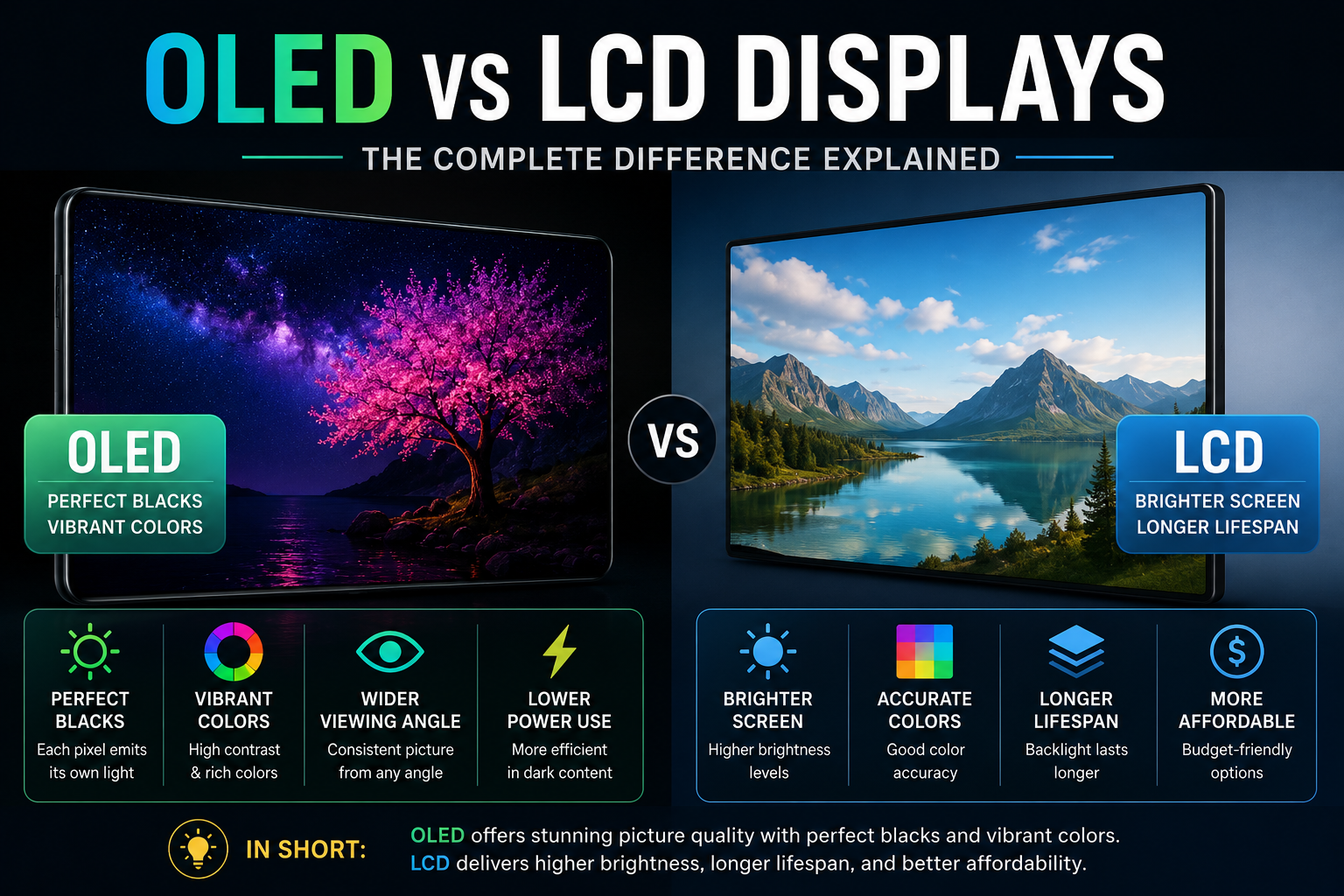
When shopping for a smartphone, television, laptop, or computer monitor, one of the most significant specifications you will encounter is the panel technology. Understanding the difference between OLED and LCD displays is essential for making an informed purchasing decision. While both technologies serve the primary purpose of outputting visual content, they do so through fundamentally different physics and engineering methods.
LCD (Liquid Crystal Display) has been the dominant screen technology for decades, evolving from standard CCFL backlights to modern LED and Mini-LED configurations. OLED (Organic Light-Emitting Diode), on the other hand, represents a newer paradigm where individual pixels generate their own illumination. This article breaks down how both technologies operate, their technical strengths, inherent limitations, and which screen type best fits your specific usage habits.
How OLED and LCD Display Technologies Work
To understand performance differences, it helps to first look at how each display architecture generates light and color.
Understanding LCD Technology and Backlighting
An LCD panel relies on a separate light source located behind the screen layers. Liquid crystals do not emit light directly; instead, they act as tiny shutters that twist and bend to allow specific amounts of backlight through color filters (Red, Green, and Blue) to create an image.
Traditional LCDs used fluorescent tubes, but modern versions rely on Light-Emitting Diodes (LEDs). Advanced variants such as QLED (Quantum Dot LED) or Mini-LED refine this process by using smaller diodes or color-enhancing nanoparticle layers, but the underlying mechanical principle remains the same: a central backlight shining through a layer of liquid crystals.
Understanding OLED Technology and Self-Emissive Pixels
OLED screens eliminate the backlight entirely. Instead, each individual pixel is composed of organic compounds that glow independently when electrically charged. This visual characteristic is described as self-emissive technology.
Because every single pixel acts as its own light source, an OLED display can control illumination at the sub-pixel level. When a region of the image needs to be pure black, the screen simply turns off the corresponding pixels completely, resulting in zero light output from those regions.
Contrast and Brightness: The Primary Difference Between OLED and LCD Displays
The optical characteristics of brightness and contrast highlight the fundamental structural difference between OLED and LCD displays during everyday viewing.
Infinite Contrast Ratios and True Black Levels
Contrast ratio measures the luminance gap between the brightest white and the darkest black a display can produce. Because LCD panels rely on a backlight that is always on, the liquid crystal shutters cannot completely block 100% of the light. As a result, dark areas on an LCD often appear slightly gray or washed out in dark room settings.
OLED displays achieve an theoretically infinite contrast ratio. By switching individual pixels entirely off, dark areas reach true black (0 nits of light output). This creates striking pop, depth, and clarity in dark visual scenes, such as nighttime cinematic footage or space environments.
Peak Brightness and Full-Screen Luminance
Where LCD technology excels is absolute peak brightness. High-end LED and Mini-LED screens can push thousands of nits across large screen areas without risk of thermal overload or rapid component degradation. This makes top-tier LCDs extremely effective at cutting through ambient glare in sunlit rooms.
While modern OLED panels are continuously improving, they generally feature lower full-screen brightness compared to premium LCD counterparts. Automatic Static Brightness Limiters (ABL) in OLED screens dim full-field white screens (like bright spreadsheets or snowy sports fields) to regulate power and manage heat.
Color Accuracy, Viewing Angles, and Motion Handling
Beyond contrast and brightness, display performance relies on color consistency across angles and rapid frame transitions.
Off-Axis Viewing Angles
LCD panels suffer from color shift and contrast degradation when viewed from the side. In-Plane Switching (IPS) LCDs offer respectable viewing angles, but Vertical Alignment (VA) LCDs—popular in high-contrast TVs—lose substantial color accuracy when viewed off-center.
OLED panels maintain consistent color output and contrast even at sharp off-axis viewing angles. Because light is generated right at the glass surface rather than passing through multiple internal crystal layers, images remain uniform regardless of seating position.
Pixel Response Times and Motion Blur
Pixel response time measures how fast a pixel can switch from one color to another. Slow response times result in visible motion blur, ghosting, or smearing during high-speed gaming or action scenes.
- LCD Response Times: Typically range from 1ms to 5ms GTG (Gray-to-Gray), requiring overdrive circuits to prevent blurring.
- OLED Response Times: Near-instantaneous, often below 0.1ms. This produces crisp motion clarity without noticeable trailing.
Power Efficiency and Lifespan: Difference Between OLED and LCD Displays
Energy demands and component longevity vary considerably depending on panel architecture and visual content habits.
Dynamic Energy Consumption Dynamics
An LCD panel draws a relatively constant amount of power dictated by its backlight brightness setting, regardless of whether the image is mostly black or full white. In contrast, OLED energy consumption scales directly with screen content.
Displaying dark themes or black backgrounds on an OLED uses very little power because black pixels are turned off. However, displaying a solid white image at high brightness on OLED causes all sub-pixels to draw maximum power, potentially consuming more electricity than a comparable LCD screen.
Image Retention and OLED Burn-in Risks
Because OLED uses organic compounds, individual pixels degrade over long periods of usage. If static elements (such as news tickers, channel logos, or desktop taskbars) are displayed at high brightness continuously for thousands of hours, those specific pixels age faster than surrounding ones, leading to permanent image retention known as burn-in.
LCD displays do not suffer from permanent organic burn-in. While temporary image retention can occasionally occur on older LCDs, it typically disappears over time without damaging the panel.
Manufacturing Costs, Form Factors, and Durability
The practical engineering differences affect how manufacturers design devices and set market prices.
Flexibility and Ultra-Thin Designs
Because OLED screens do not require a separate backlight array, diffusion sheets, or thick light guide plates, the display assemblies can be made exceptionally thin. Furthermore, flexible plastic substrates allow OLEDs to be bent or rolled, enabling foldable smartphones and curved gaming monitors.
LCD panels require rigid glass layers and a dedicated backlighting module, making them thicker, heavier, and incapable of folding without breaking screen layers.
Production Yields and Market Pricing
LCD manufacturing is a mature, highly scalable process. Consequently, basic LCD panels are inexpensive to produce in both small smartphone screen sizes and massive 85-inch desktop/TV formats.
OLED fabrication remains technically complex and costly, particularly for mid-sized (laptop/monitor) and massive display panels. While prices continue to fall, OLED displays command a price premium over entry-level and mid-range LCD displays.
Summary Matrix: Difference Between OLED and LCD Displays
Below is a head-to-head performance overview contrasting both display panel technologies across key categories.
Technical Comparison at a Glance
Review this side-by-side breakdown to compare core operational features:
- Black Levels: OLED provides absolute true black (0 nits); LCD produces deep gray to elevated black depending on local dimming zones.
- Contrast Ratio: OLED reaches theoretical infinity; LCD ranges from 1,000:1 (IPS) to 6,000:1 (VA) up to dynamic ratios on Mini-LED.
- Peak Brightness: LCD excels with extreme brightness (1,000 to 3,000+ nits); OLED typically achieves moderate peak brightness (600 to 1,500 nits).
- Response Speed: OLED achieves ultra-fast response times (<0.1ms); LCD operates from fast to moderate (1ms to 5ms).
- Burn-In Vulnerability: OLED carries potential risk under heavy static usage; LCD has no permanent burn-in risk.
- Wide Viewing Angles: OLED maintains near-perfect consistency; LCD varies (IPS is good, VA drops off quickly off-axis).
How to Choose: Which Display Tech Is Right for You?
Selecting the best panel depends on your room environment, media consumption habits, and budget boundaries.
When to Buy an OLED Display
An OLED display is the optimal choice if you:
- Watch movies or play immersive single-player games in dim or dark rooms.
- Prioritize absolute black levels, dark shadow detail, and high HDR visual impact.
- Play competitive video games requiring ultra-fast pixel response times.
- Desire wide off-axis viewing angles for group movie watching.
When to Buy an LCD Display
An LCD display (including LED, QLED, and Mini-LED models) is better suited if you:
- Place the display in a brightly lit room with large uncovered windows.
- Use the screen primarily as a PC monitor for office work, desktop apps, or static editing software over long hours.
- Want a large screen size on a tight budget.
- Prefer zero concern regarding permanent image retention or burn-in over many years of use.
Frequently Asked Questions
Is OLED better than LCD for competitive gaming?
Yes, OLED is generally superior for competitive gaming due to its near-instantaneous pixel response time (below 0.1ms). This eliminates pixel motion blur and ghosting during high-speed visual movement, providing clearer tracking of targets.
Is QLED an OLED or an LCD?
QLED is a type of LCD screen. It uses a standard backlight and liquid crystal layer enhanced with a Quantum Dot film to increase color volume and peak brightness. It does not use self-emissive organic pixels like OLED.
How long do OLED displays typically last?
Modern OLED displays are rated for around 30,000 to 100,000 hours of viewing time before reaching half brightness. With modern pixel refreshers and automatic dimming protections, severe burn-in is rare under normal consumer usage.
Why are LCD displays brighter than OLED displays?
LCD displays can incorporate powerful backlights behind the entire panel layer without overheating individual sub-pixels. OLED pixels generate light and heat in tiny, delicate organic layers, requiring power limiters to manage thermal limits and panel longevity.
Which display uses less battery in mobile devices?
OLED displays use significantly less battery power when displaying dark user interface themes or playing dark video content, because dark pixels switch off entirely. However, displaying bright white screens constantly can draw equal or more power than an LCD.
What is Mini-LED and how does it compare to OLED?
Mini-LED is an advanced form of LCD backlighting that uses thousands of tiny LED backlights organized into hundreds or thousands of local dimming zones. It provides brightness levels and contrast ratios that approach OLED quality while avoiding burn-in risks.
Conclusion
The difference between OLED and LCD displays comes down to fundamental light output mechanics: OLED controls light at the individual pixel level, whereas LCD relies on a shared backlight filtered by liquid crystals. OLED offers unmatched black levels, infinite contrast ratios, and instant response times, making it the premier choice for cinematic viewing and gaming enthusiasts. Conversely, high-end LCD panels deliver superior peak brightness, zero burn-in risk, and better value across larger screen sizes in bright environment settings.
Related Reading
- Mini-LED vs OLED technology — In-depth comparison between modern Mini-LED backlights and OLED screens.
- how to prevent OLED burn-in — Practical settings and habits to protect OLED screens from image retention.
- understanding display refresh rates — Guide explaining refresh rates, response times, and gaming performance.
- HDR formats explained — Overview of peak brightness, local dimming, and dynamic range standards.