Guide · Aug 16, 2026
How Does an SSD Work?
Learn how an SSD works to store and retrieve data at lightning speeds. This guide breaks down NAND flash memory, the SSD controller, wear leveling, and how solid-state drives differ from mechanical hard drives.
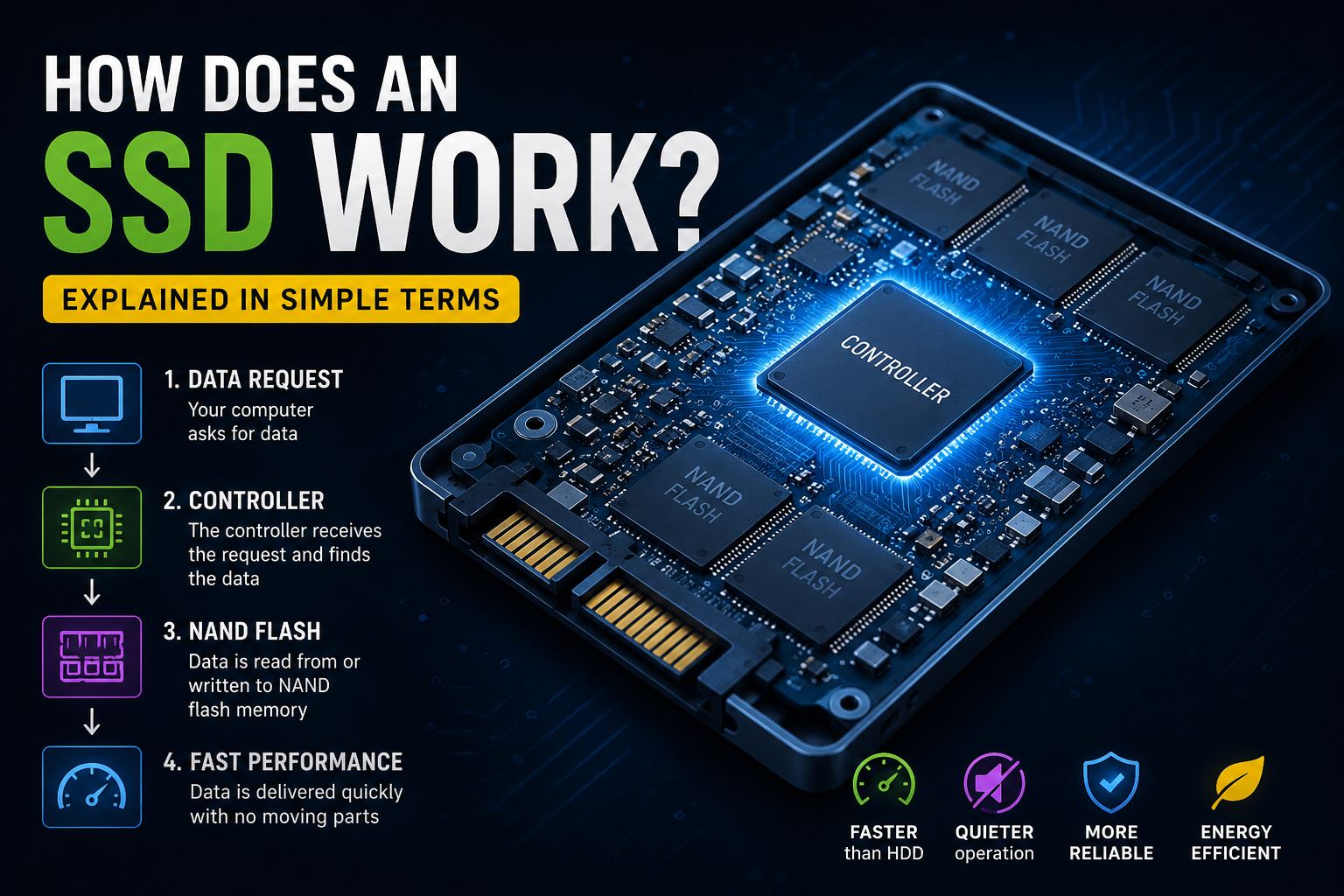
For decades, computer storage relied on spinning magnetic platters to read and write data. However, the rise of the Solid-State Drive (SSD) revolutionized modern computing. But how does an ssd work without any moving parts, and why is it so much faster than a traditional hard drive? In this comprehensive guide, we will break down the complex physics and engineering inside an SSD, explaining how it manages, stores, and protects your digital life in milliseconds.
Understanding How an SSD Works at a Glance
To understand how an SSD works, it helps to contrast it with a traditional Hard Disk Drive (HDD). While an HDD acts like a record player—using a mechanical arm to read data off a spinning platter—an SSD functions entirely electronically. It uses semiconductor technology to access data near-instantaneously.
Moving Away from Moving Parts
Because an SSD has zero moving parts, it does not suffer from the mechanical latency inherent in HDDs. There is no waiting for a disk to spin up to speed or for a read/write head to find a physical sector on a platter. This lack of physical movement is the primary reason why SSDs are highly durable, silent, and incredibly fast.
The Core Components of an SSD
An SSD consists of three primary components working in tandem:
- NAND Flash Memory: The storage chips where your files physically reside.
- The Controller: The embedded processor that acts as the brain of the drive, directing read and write operations.
- DRAM Cache: A small amount of volatile memory used to speed up access to frequently used data and mapping tables (not present in all budget SSDs).
How NAND Flash Memory Stores Data Without Power
At the heart of solid-state technology is NAND flash memory. This is a type of non-volatile storage, meaning it retains saved data even when your computer is powered off. But how does this memory hold onto electrical charges without a constant power source?
Floating Gate vs. Charge Trap Transistors
NAND flash utilizes microscopic transistors arranged in a grid. Traditionally, these transistors used a Floating Gate to trap electrons. Modern SSDs often use Charge Trap technology, which uses an insulating layer to hold electrons in place. By trapping or releasing electrons within these gates, the drive alters the electrical conductivity of the cell, translating the state into binary code: 1s and 0s.
SLC, MLC, TLC, and QLC: Cell Types Explained
SSDs store varying amounts of bits per cell, which impacts speed, capacity, and lifespan:
- Single-Level Cell (SLC): Stores 1 bit per cell. Extremely fast and durable, but low capacity and expensive.
- Multi-Level Cell (MLC): Stores 2 bits per cell. Good balance of speed and endurance.
- Triple-Level Cell (TLC): Stores 3 bits per cell. The standard for most consumer SSDs today.
- Quad-Level Cell (QLC): Stores 4 bits per cell. Offers high capacity at a lower cost, but with slower write speeds and lower endurance.
The Crucial Role of the SSD Controller
If NAND flash is the warehouse where data is stored, the controller is the logistics manager. The controller is a microchip that executes the firmware instructions of the SSD, making critical decisions about where and how data is written.
Managing Read and Write Operations
The controller translates requests from your operating system into physical actions on the NAND chips. When you open a file, the controller locates the exact cells holding those bits and directs them to the system memory. When saving a file, it determines which cells are clean and ready to accept new data.
Wear Leveling and Garbage Collection
NAND flash cells degrade every time they are written to and erased. To prevent certain cells from wearing out while others remain unused, the controller employs wear leveling. This process distributes write operations evenly across all available cells. Additionally, the controller runs garbage collection to clear out deleted data blocks, preparing them for future write cycles.
How Does an SSD Work to Write and Erase Data?
Writing data to an SSD is not as simple as overwriting a sector on a hard drive. NAND flash memory has strict rules about how data can be written and erased, which heavily influences how the drive operates over its lifespan.
The Page and Block Dilemma
NAND flash memory is organized into pages (typically 4KB to 16KB in size), which are grouped together into larger blocks (usually 128 to 256 pages). An SSD can read and write data at the page level, but it can only erase data at the block level. This creates a unique challenge when data needs to be modified.
Why SSDs Slow Down Over Time (Write Amplification)
Because an SSD cannot overwrite an existing page directly, it must copy the good data from a block to a temporary location, erase the entire block, and then write the updated data back. This process is called Write Amplification. Over time, as the drive fills up, this extra overhead can cause write speeds to decrease. To mitigate this, technologies like the TRIM command tell the controller which blocks contain discarded data so they can be cleaned in the background.
How Connection Interfaces Impact SSD Performance
The internal architecture of an SSD is only half of the speed equation. How the drive connects to your motherboard determines the maximum speed at which data can travel to your processor.
SATA vs. NVMe Protocols
Older SSDs used the SATA interface, which was originally designed for slow HDDs. SATA caps speeds at roughly 550 to 600 MB/s. Modern SSDs use the NVMe (Non-Volatile Memory Express) protocol, designed specifically for solid-state storage. Running over the PCIe bus, NVMe drives can achieve read speeds exceeding 7,000 MB/s by utilizing multiple parallel lanes of communication.
M.2, 2.5-inch, and PCIe Form Factors
SSDs come in various physical designs. The traditional 2.5-inch form factor mimics old laptop hard drives. The modern M.2 form factor resembles a small stick of chewing gum and plugs directly into the motherboard, eliminating the need for power and data cables.
Frequently Asked Questions
Do SSDs wear out over time?
Yes, SSDs have a limited lifespan measured in Terabytes Written (TBW). Every write/erase cycle causes microscopic physical wear on the NAND cells. However, modern wear-leveling algorithms ensure that consumer SSDs easily last 5 to 10 years under normal daily use.
What is the difference between an SSD and an HDD?
An HDD uses magnetic spinning platters and a moving mechanical head to read/write data. An SSD uses non-volatile NAND flash memory chips and a digital controller with no moving parts, making it significantly faster, quieter, and more durable than an HDD.
How does an SSD store data when turned off?
An SSD uses floating gate or charge trap transistors that isolate and trap electrons. Because these trap layers are highly insulated, the electrons remain trapped in place even when electrical power is disconnected, preserving your binary data.
Do SSDs need defragmentation?
No. You should never defragment an SSD. Defragmentation is designed for HDDs to gather contiguous data on a physical disk. On an SSD, it only causes unnecessary write cycles, wearing out the drive faster. Modern operating systems use TRIM optimization instead of defragmentation for SSDs.
What is DRAM on an SSD and do I need it?
DRAM acts as a high-speed map for the SSD, tracking where files are physically located on the NAND chips. SSDs with DRAM are faster at finding files and handling heavy workloads. DRAM-less SSDs are cheaper but rely on system RAM (via Host Memory Buffer) or slower lookup methods, which can reduce performance during sustained writes.
Conclusion
Understanding how does an ssd work reveals the incredible engineering that makes modern computing so responsive. By replacing mechanical components with silicon chips, NAND flash memory, and intelligent controllers, SSDs have eliminated the biggest performance bottleneck in personal computers. Whether you are gaming, editing video, or simply browsing the web, the silent and lightning-fast operation of your SSD is a testament to the power of solid-state physics.
Related Reading
- SATA vs NVMe performance — A detailed comparison of storage protocols and bus interfaces.
- signs of a failing SSD — How to monitor SSD health and identify early warning signs of failure.
- how to install an M.2 SSD — A step-by-step guide to installing a modern M.2 solid-state drive.